Extension

Shopware extension: the shop reports what is invisible from outside

The DomainWarn extension for Shopware 6 adds the domains of every sales channel to monitoring, reports versions, pending updates and the mail setup every 15 minutes, and shows the state right in the shop admin.

Coming soon to the Shopware StoreStart for free

Free. What is charged is the monitoring service, not the extension.

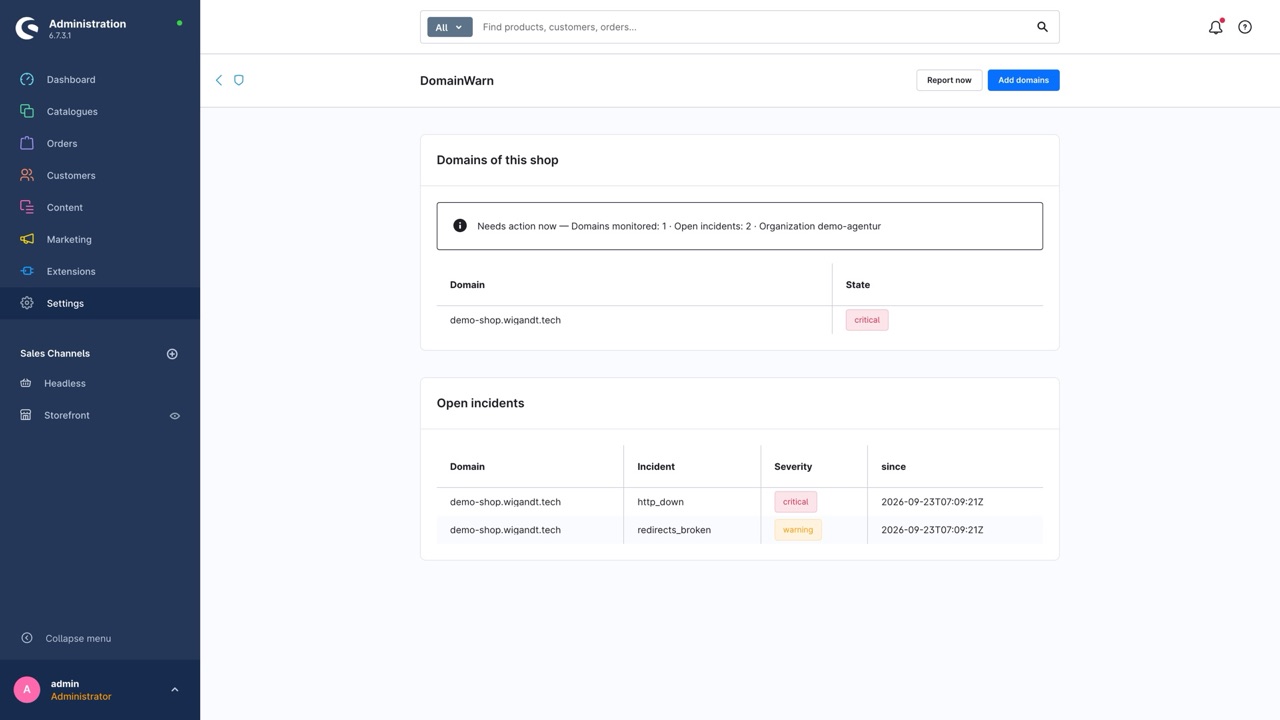
Shopware admin, Settings → DomainWarn: the domain of the shop in state "critical" and two open incidents with severity and start.

For agencies that look after Shopware shops

A shop is not only broken when the page stays white. It is also broken when no order confirmation has gone out for three days because the queue has stalled, or when a plugin has been carrying a pending update for months. The extension adds exactly this inside view to the outside checks.

It adds the domains of every sales channel, including the language and staging channels you forget when adding by hand, and assigns them to a client if you like. In the shop admin the shop only sees its own domains and incidents, not those of other clients of the same organization.
What the extension reports

  • Shopware and PHP version

    The exact version instead of a guess. Whether it is outdated or no longer gets security updates is judged by DomainWarn from the current releases.

  • Extensions with an update

    Installed plugins and apps with the version Shopware itself knows as an update.

  • Mail setup

    Sender address and mail server. Together with the DNS records this yields the finding "your shop sends through a server that is not in the SPF record".

  • Maintenance mode

    If a sales channel is in maintenance mode, customers and search engines only see the maintenance page. DomainWarn points it out.

  • Scheduled task heartbeat

    A scheduled task reports in every 15 minutes. If it stops, the message queue or the cron job has stalled – the shop looks healthy but processes nothing. The heartbeat sets itself up, there is no address to copy.

  • State in the shop admin

    Under Settings → DomainWarn you find the domains of the shop with their state, domains not yet monitored with a button to add them, and the open incidents – without switching to the dashboard.

Set up in three steps

  1. Install and activate the extension in the shop (Extensions → My extensions).
  2. Under Settings → Extensions → DomainWarn click "Connect with DomainWarn". You confirm in DomainWarn, and the token reaches the shop server to server – never through the browser, nothing to copy.
  3. "Test connection", then "Add domains" under Settings → DomainWarn. From then on the scheduled task domainwarn.report reports every 15 minutes.

Prefer to do it by hand? Paste a token with write scope from DomainWarn (Settings → API) into the "API token" field. For deployments the same steps exist as commands: bin/console domainwarn:test, bin/console domainwarn:sync-domains and bin/console domainwarn:report.

For the heartbeat to work, the scheduled tasks of the shop must run (bin/console scheduled-task:run as a service or cron job) – which is exactly what it checks.

Requirements

Shopware 6.6.10 to 6.7, PHP 8.2 or newer and a DomainWarn account – the free one is enough.

Which data is transmitted

Transmitted are the domains of the sales channels, Shopware and PHP version, names and versions of installed extensions, sender address and mail server, and the maintenance mode. Not transmitted are customer data, orders, products, prices or shop content. The API token is stored in the shop only and never reaches the browser.

Setup, inside view and heartbeat for all extensions are described in detail in the documentation.Integrations in the docs

Frequently asked questions

Do I need a paid account?
No. The extension is free and works with the free DomainWarn account. What is charged is the monitoring service, once more domains or shorter check intervals are needed.
Is customer data transmitted?
No. Transmitted are domains, versions, installed extensions, sender address and mail server, and the maintenance mode. No customers, orders, products, prices or shop content.
Why does DomainWarn open an incident although the shop is up?
Because the heartbeat stopped. Then the message queue or the cron job has stalled: the shop still answers, but it sends no mail and processes nothing.
Does the extension work with a self-hosted DomainWarn?
Yes. The API address can be changed under "Advanced".

Create an account, connect the extension

Signing up takes a minute. Then you connect the extension in one click, and the inside view sits next to certificate, DNS and email of the same domain.

Every feature, no credit card, cancel monthly.

More extensions: WordPress plugin · Chrome extension · All integrations